

FAQs
ABOUT ADVISOR ACCESS
Advisor Access provides secure and convenient online access to help you:
-
Where can I find Advisor Access on the website?
You can sign in to Advisor Access by visiting b2bbank.com/advisoraccess. Alternatively, visit the top navigation of b2bbank.com, click on the "Sign in" drop down, and select "Advisor Access".
-
How do I obtain my User ID and register for Advisor Access?
Contact Client Services Monday to Friday at:
-
Why did my clients receive both a Registration ID and a Registration PIN?
To enhance security and the login process, your clients will have received both a Registration ID and a Registration PIN. To register, they can follow the steps indicated on Investor Access. When they log in to Investor Access for the first time, they will need to use their Registration PIN as their password.
-
Why is my authenticator app displaying a different system when I try to complete multifactor authentication?
Within Laurentian Bank, we have several systems for which we use an authenticator app, including Advisor Access, EASE, Group Access, Investor Access, LBC e-Flex, etc. The authenticator app will display the first system you first set up multifactor authentication for, regardless of which you’re using it for.
-
What information is available through Advisor Access?
With Advisor Access you may view (if applicable):
1 These documents are printable.
LOAN-TO-VALUE FEATURE IN REPORTING
Our aim is to work proactively with advisors to help you effectively manage your clients' LTVs, in addition to proposing options tailored to each client. To achieve this, we have enhanced the reporting we provide via Advisor Access to include information about LTVs.
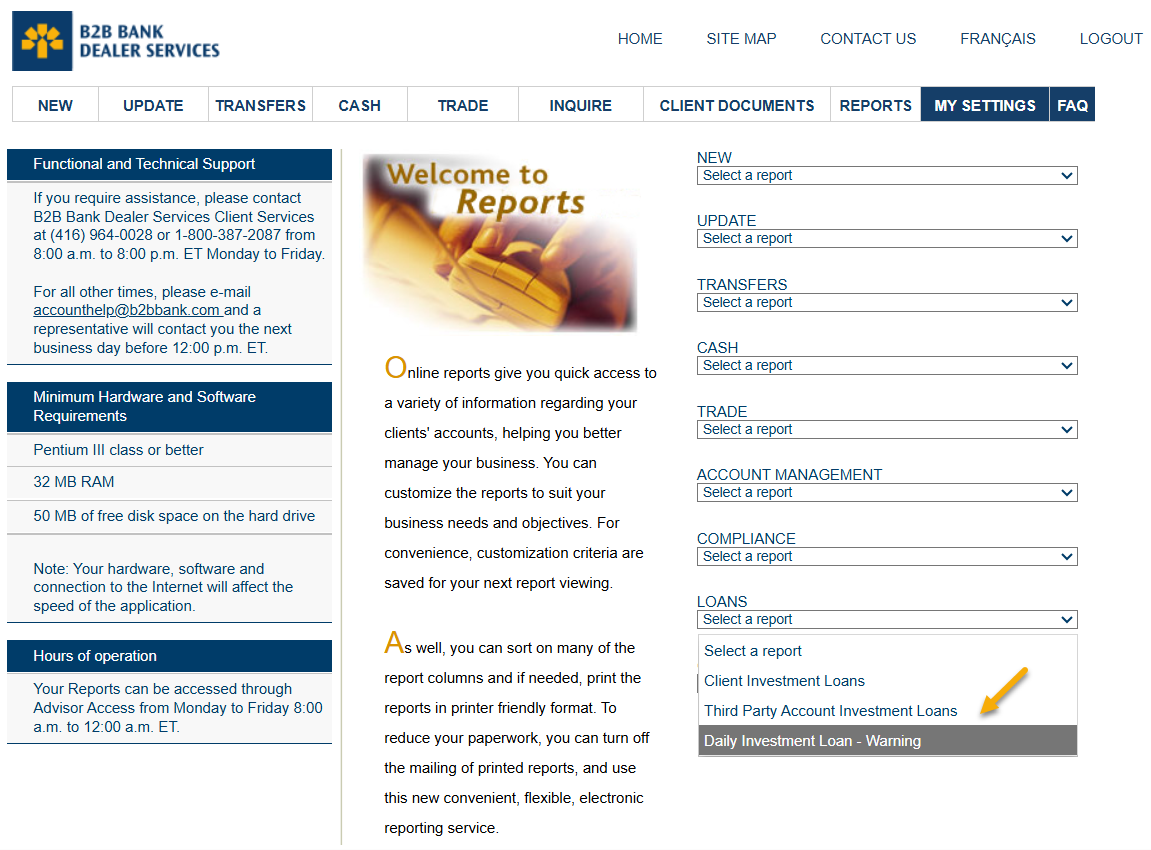
DAILY INVESTMENT LOAN – WARNING REPORT
-
How will loan-to-value (LTV) reporting help me and my clients?
The enhanced reporting allows you to find up-to-date information on your clients' LTV, loan and investment balances. If the LTVs for any of your clients' Investment Loans have exceeded acceptable LTV thresholds, their loan will be included on this report so you can proactively work with them to get their LTVs inline.
-
How will I know if my clients' investments have reached or exceeded B2B Bank's acceptable LTV thresholds?
The "Daily Investment Loan – Warning Report" lists all clients who have reached or exceeded B2B Bank's acceptable LTV thresholds. We've added this reporting as well as the weekly eAlerts to help you stay informed about your clients' LTVs.
-
Where can I find my clients' LTV, loan and investment balances on Advisor Access?
-
Why does the report say "action required" when the loan is not a margin loan?
We are focused on helping you better manage your clients' LTVs. If your clients' LTVs are approaching our acceptable thresholds, their loans will be added to the LTV report. The report will help you proactively work with your clients to help improve their financial situation.
-
Why am I being asked to take action?
We are asking you to take action to help your clients improve their LTV position to avoid further action (if required) from B2B Bank.
-
What actions can I take to help my clients before they reach the LTV limit?
You can offer clients the following options to manage their LTVs:
-
Pledge additional investments:
- pledging loan eligible mutual/segregated funds
- pledge letter
-
Pledge new monies:
-
cheque (payable to B2B Bank Financial Services Inc., B2B Bank Securities Inc. or B2B Bank Intermediary Services Inc.). Purchase instructions can be submitted via:
- Mutual Fund Trade Ticket
- Segregated Fund Trade Ticket
- Dealer placed wire-order
-
cheque (payable to B2B Bank Financial Services Inc., B2B Bank Securities Inc. or B2B Bank Intermediary Services Inc.). Purchase instructions can be submitted via:
-
Pay down the loan balance:
- cheque, or
- one-time debit
-
Increase loan payment:
- Letter of Direction or PAD (Pre-authorized Debit Agreement)
-
Switch to Principal and Interest payment:
- Letter of Direction or PAD (Pre-authorized Debit Agreement)
-
Pledge additional investments:
eAlerts
-
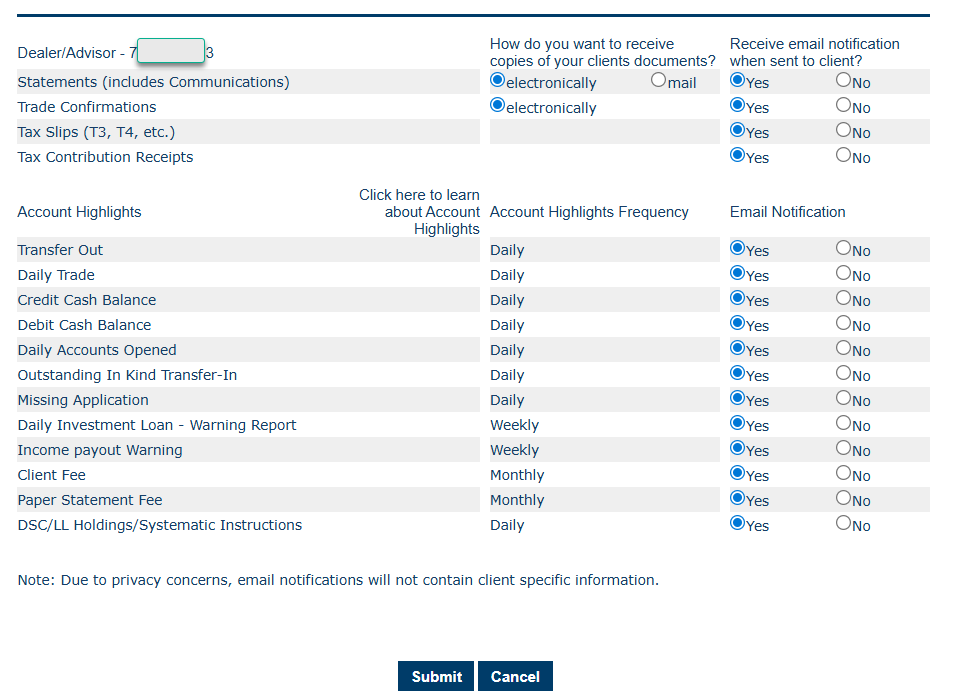
How do I sign up for eAlerts?
Once you've registered and signed in to Advisor Access, select "My Settings" from the top navigation. Next:
-
How often are LTV eAlerts sent?
eAlerts are sent weekly.
-
Will I receive separate eAlert emails for each alert type I select, or will they be consolidated into a single email?
eAlerts are consolidated and sent in a single email and delivered based on the frequency (daily, weekly, monthly) indicated in the Account Highlights frequency section.